MA PLO Assessment
In order to fulfill graduation requirements, every student in the iSchool’s accredited master’s program must complete a PLO Assessment highlighting how they have satisfied the iSchool Program Learning Outcomes.
Each PLO Assessment is graded pass/fail prior to graduation. PLO Assessments are more thoroughly assessed by a committee after graduation to determine how well the graduating class as a whole achieved each learning outcome. The results of this assessment are included in the iSchool Annual Assessment Report and help shape program decisions. Thus, the PLO Assessment is both a graduation breadth requirement and a critical component of continuous program evaluation that significantly contributes to the ALA accreditation process.
PLO Assessments are comprised of the following:
- Artifacts that are concrete examples of how you satisfied each learning outcome. You may use a single artifact as evidence for more than one learning outcome. You must include at least 3 distinct artifacts.
- Justification statements that describe how you have achieved each learning outcome and how the artifact provides evidence of the achievement of a learning outcome. You must write a separate justification statement for each of your assigned program learning outcomes.
Deadlines & Policies
Initial Submission Deadlines
Students Graduating in Fall 2026
- Fall 2026: Monday, November 23, 2026
Students Graduating in Spring or Summer 2027
- Spring 2027: Monday, April 19, 2027
- Summer 2027: Monday, July 19, 2027
Compilation
Your PLO Assessment will consist of EITHER the odd numbered PLOs (1, 3, 5, & 7) or the even numbered PLOs (2, 4, & 6) based upon the year you began the program. If you began the program in Fall 2024 (even year), you will compile artifacts, descriptions, and justification statements for the even numbered PLOs. If you began the program in Fall 2025 (odd year), you will compile artifacts, descriptions, and justification statements for the odd numbered PLOs.
You may begin compiling your artifacts at any time and can upload them as soon as you have been added to the Graduating Student Portal.
The Graduate Student Advisor, Dennis Choi, will send an email with instructions for enrolling in the Graduating Student Portal in CANVAS. If you have not received this message by the end of your first semester in the program, please contact Dennis Choi at dhchoi@wisc.edu.
Submission
Your PLO Assessment will be reviewed by the The iSchool Graduate Programs Advising Team. If you are instructed to revise any aspect of your PLO Assessment, you must resubmit once you have completed your revisions to prompt a second review.
Completion
Upon submission, PLO Assessments are reviewed by a member of the iSchool Graduate Programs Advising Team for completeness and to ensure all artifacts are accessible. Any necessary revisions must be completed in order for you to successfully complete the PLO Assessment graduation requirement.
Your PLO Assessment requirement will be marked Complete or Incomplete in the Graduating Student Portal in CANVAS.
Storage
PLO Assessment content should be limited to material aimed at demonstrating program breadth requirements through the program learning outcomes. The iSchool reserves the right to remove content that it deems inappropriate or problematic, or that exceeds reasonable file sizes.
Due to storage limitations, please do not upload audio or video files to Canvas. Instead, link to media and other large files housed on other servers, such as YouTube, Kaltura, Google Drive, or Box. Please make sure you have made those items visible to anyone with the link.
Privacy
Your PLO Assessment is set-up to be only visible to you and to iSchool staff who conduct program quality reviews.
Retention
The iSchool will not maintain your PLO Assessment after it is reviewed by program quality reviewers. You are responsible for migrating or copying your content prior to that date if you wish to do so. Once a PLO Assessment is deleted, content cannot be retrieved.
Submission Instructions
Go to the Graduating Student Portal. Go to the Assignments tab. Each PLO you need to address will be a separate “assignment” in Canvas.
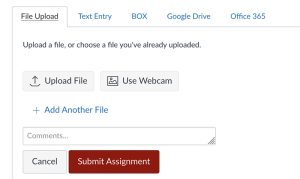
Instructions: Submit TWO items, both as PDF file uploads.
*Note: After uploading your first PDF file, select “Add Another File” to load the second file. See below for a screenshot of this.
- Your artifact
- Upload your artifact as a PDF document
- Naming convention: PLO1_Last Name_First Name_Artifact
- Within your PDF, you may link out to an online file such as Google or UW Box, but make sure the link is ACTIVE
- Double check that all permissions are set to “Anyone with link can view”
- See description of artifact below
-
- A justification statement for your artifact
- Upload your justification statement as a PDF document
- PLO1_Last Name_First Name_Justification
- See description of justification statement below
What Is An Artifact?
An artifact is a product created by you (or a group you worked in) through which you applied knowledge of one or more iSchool Program Learning Outcome. It is often a product from a class, practicum, or extracurricular experience.
- Due to CANVAS storage restrictions of 10MB, large files, such as presentations or audio and video recordings, should be stored on external services.
- Include links in your PDF to these files stored on cloud storage services such as Google Drive or Box. Double check that permissions are set to: Anyone with the link can view.
Reflective essay option: The iSchool faculty understand that students undertake experiences that do not necessarily result in something that can be directly used as an artifact (e.g., student group, professional organization, or volunteer activities). In this case, students should write a reflective essay that fully describes the experience and explains the importance of the experience to their professional growth. The associated justification statement will explain how the experience demonstrates the achievement of a learning outcome. The reflective essay should be around 250 words and can have a very direct title, such as “Reflective Essay on X Experience.”
What Is A Justification Statement?
A justification statement explains how the artifact demonstrates that you have achieved an iSchool Program Learning Outcome.
The justification statement is 3-5 sentences long, and focuses on ONE learning outcome.
A justification statement is a personal reflection on how your experience related to the learning outcome impacted you or changed the way you thought about your role as a developing professional.
- It explains HOW you achieved the learning outcome.
- It explains WHY the associated artifact is good evidence of achievement of the learning outcome.
- It justifies claims about the learning outcome by pointing to particular parts of the artifact.
A poor justification statement merely describes the artifact, or merely repeats the text of the learning outcome. It may make claims about achieving learning outcomes without pointing to any evidence in the artifact or elsewhere. It may attempt to combine multiple learning outcomes into one statement.
Help & Additional Resources
iSchool PLO Assessment assistance
Contact Tanya Hendricks Cobb or your advisor for help with the content of your PLO Assessment, including:
- Confusion about requirements
- Feedback on justification statements
- Formatting your artifact
- General questions regarding content
Contact Dennis Choi for technical help related to your PLO Assessment, including:
- Canvas
- Uploading media
- Formatting pages
- General technical questions
Contact Dennis Choi for help related to accessing the Graduating Student Portal. See iSchool Faculty & Staff Directory for contact information.
Tanya Hendricks Cobb, MA Graduate Program Manager: tcobb@wisc.edu
Dennis Choi, Graduate Student Advisor: dhchoi@wisc.edu
Uploading A 2nd File In CANVAS